Description
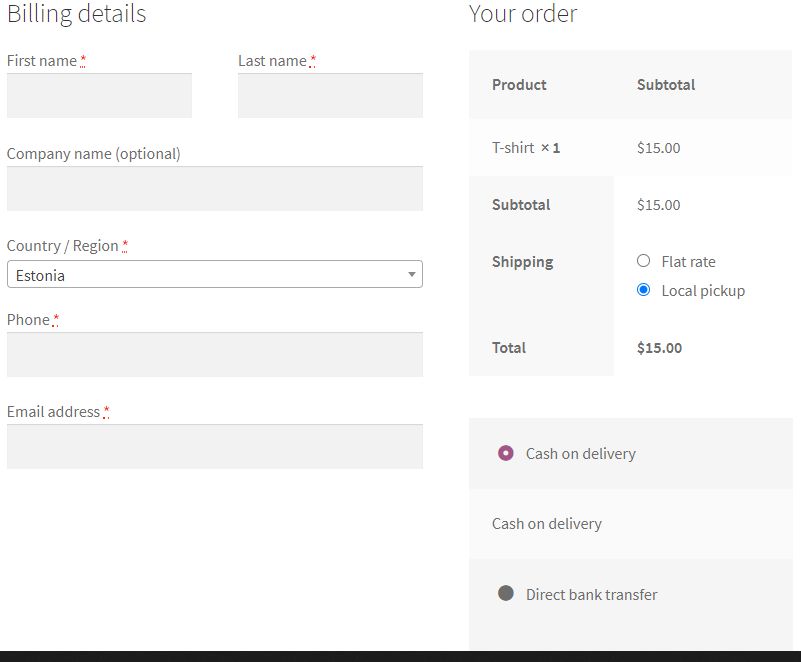
WooCommerce plugin for hiding the billing address fields on checkout based on the selected shipping/payment methods.
How To Use
- Plugin Settings: Choose for which payment/shipping methods the billing address fields will be hidden.
How It Works
- Each time the customer will modify his shipping/payment methods on checkout, the plugin will show/hide the billing address fields accordingly.
Features
- Conditions: Choose which shipping methods and payment methods will cause the billing address fields to be hidden (for example local pickup and cash).
- Billing Address Fields: Choose which billing address fields to hide when conditions are met.
- Top Options: The shipping/payment options can be moved to the billing details section on checkout.
- Customer Address: The address of the customer from previous orders will be kept in his user details after creating an order with no billing address fields.
- Shipping Options Shortcode: Display the shipping options anywhere using the [haf_shipping_options] shortcode.

Reviews
There are no reviews yet.